
2.4. Example: Multiple Linear Regression Estimating Fuel Efficiency#
import pandas as pd
import numpy as np
import matplotlib.pyplot as plt
import seaborn as sns
data_df = pd.read_csv('https://raw.githubusercontent.com/shreyamdg/automobile-data-set-analysis/refs/heads/master/cars.csv')
data_df.head()
| Unnamed: 0 | symboling | normalized-losses | make | fuel-type | aspiration | num-of-doors | body-style | drive-wheels | engine-location | ... | engine-size | fuel-system | bore | stroke | compression-ratio | horsepower | peak-rpm | city-mpg | highway-mpg | price | |
|---|---|---|---|---|---|---|---|---|---|---|---|---|---|---|---|---|---|---|---|---|---|
| 0 | 0 | 3 | ? | alfa-romero | gas | std | two | convertible | rwd | front | ... | 130 | mpfi | 3.47 | 2.68 | 9.0 | 111 | 5000 | 21 | 27 | 13495 |
| 1 | 1 | 3 | ? | alfa-romero | gas | std | two | convertible | rwd | front | ... | 130 | mpfi | 3.47 | 2.68 | 9.0 | 111 | 5000 | 21 | 27 | 16500 |
| 2 | 2 | 1 | ? | alfa-romero | gas | std | two | hatchback | rwd | front | ... | 152 | mpfi | 2.68 | 3.47 | 9.0 | 154 | 5000 | 19 | 26 | 16500 |
| 3 | 3 | 2 | 164 | audi | gas | std | four | sedan | fwd | front | ... | 109 | mpfi | 3.19 | 3.40 | 10.0 | 102 | 5500 | 24 | 30 | 13950 |
| 4 | 4 | 2 | 164 | audi | gas | std | four | sedan | 4wd | front | ... | 136 | mpfi | 3.19 | 3.40 | 8.0 | 115 | 5500 | 18 | 22 | 17450 |
5 rows × 27 columns
data_df.columns
Index(['Unnamed: 0', 'symboling', 'normalized-losses', 'make', 'fuel-type',
       'aspiration', 'num-of-doors', 'body-style', 'drive-wheels',
       'engine-location', 'wheel-base', 'length', 'width', 'height',
       'curb-weight', 'engine-type', 'num-of-cylinders', 'engine-size',
       'fuel-system', 'bore', 'stroke', 'compression-ratio', 'horsepower',
       'peak-rpm', 'city-mpg', 'highway-mpg', 'price'],
      dtype='object')
columns_to_keep = data_df.columns[3:]
cars_df = data_df[columns_to_keep]
2.4.1. Exploratory Data Analysis#
# cars_df = cars_df[cars_df['fuel-type']=='gas']
cars_df = cars_df.query('`fuel-type`== "gas"')
cars_df.info()
<class 'pandas.core.frame.DataFrame'>
Index: 185 entries, 0 to 204
Data columns (total 24 columns):
 #   Column             Non-Null Count  Dtype
---  ------             --------------  -----
 0   make               185 non-null    object
 1   fuel-type          185 non-null    object
 2   aspiration         185 non-null    object
 3   num-of-doors       185 non-null    object
 4   body-style         185 non-null    object
 5   drive-wheels       185 non-null    object
 6   engine-location    185 non-null    object
 7   wheel-base         185 non-null    float64
 8   length             185 non-null    float64
 9   width              185 non-null    float64
 10  height             185 non-null    float64
 11  curb-weight        185 non-null    int64
 12  engine-type        185 non-null    object
 13  num-of-cylinders   185 non-null    object
 14  engine-size        185 non-null    int64
 15  fuel-system        185 non-null    object
 16  bore               185 non-null    object
 17  stroke             185 non-null    object
 18  compression-ratio  185 non-null    float64
 19  horsepower         185 non-null    object
 20  peak-rpm           185 non-null    object
 21  city-mpg           185 non-null    int64
 22  highway-mpg        185 non-null    int64
 23  price              185 non-null    object
dtypes: float64(5), int64(4), object(15)
memory usage: 36.1+ KB
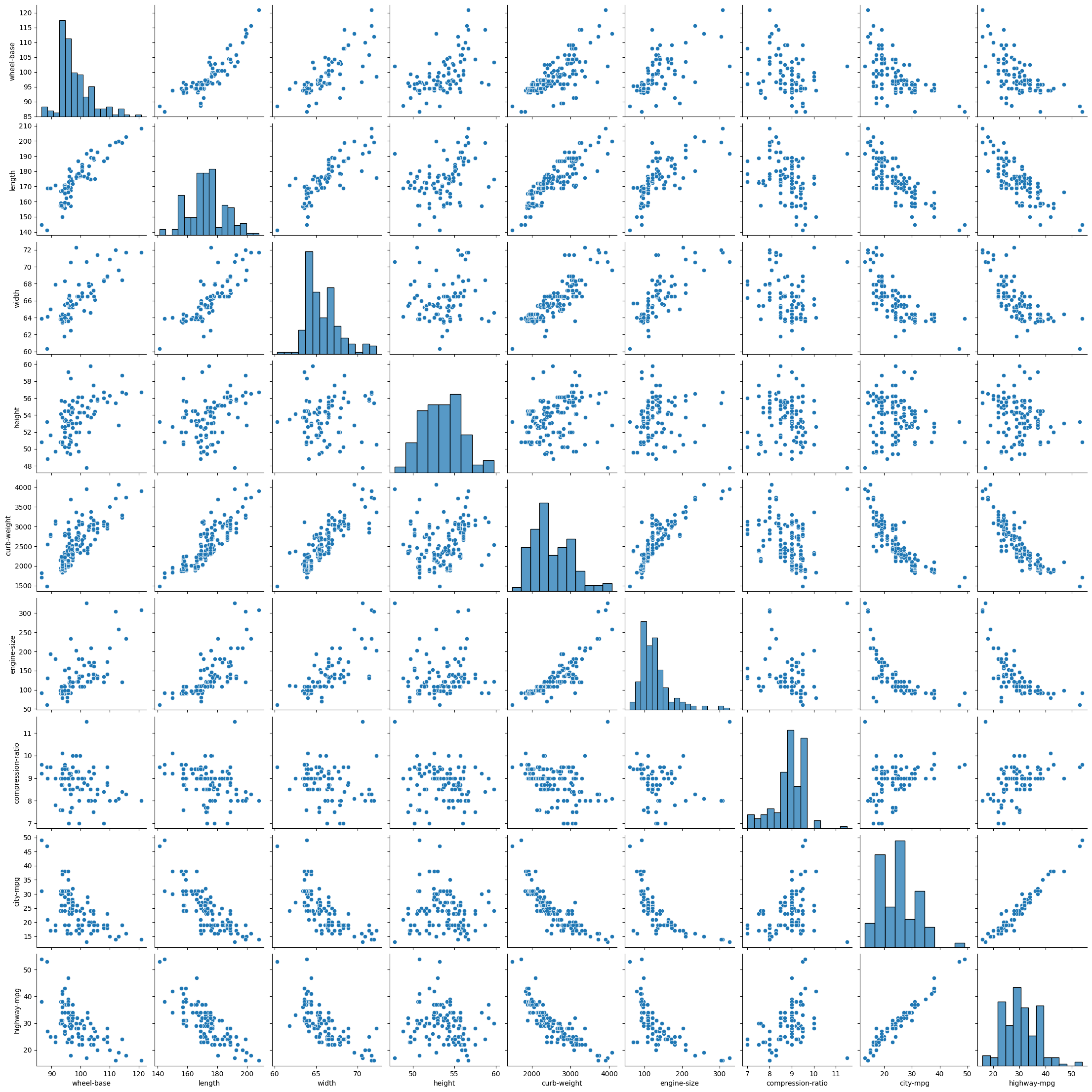
sns.pairplot(cars_df)
plt.show()
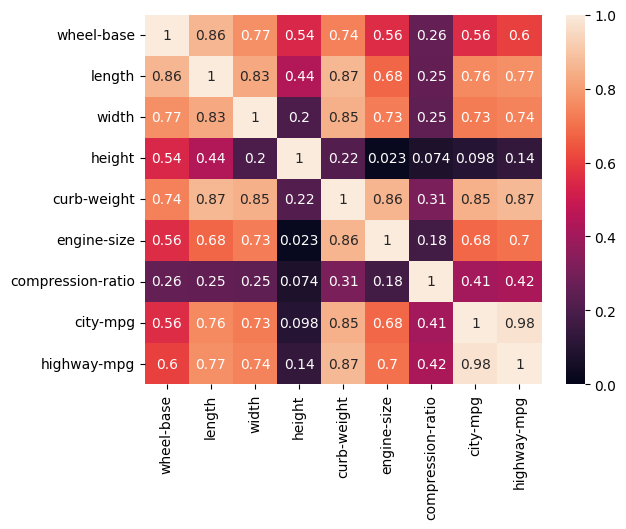
cars_corr = cars_df.corr(numeric_only=True)

sns.heatmap(np.abs(cars_corr), vmin = 0, vmax = 1, annot = True)
plt.show()
2.4.2. Modeling#
Can we estimate fuel economy from other car specifications?
# Importing packages

from sklearn.linear_model import LinearRegression
from sklearn.preprocessing import StandardScaler
from sklearn.model_selection import train_test_split
from sklearn.datasets import make_regression
from sklearn.metrics import root_mean_squared_error, r2_score
# Chose features from correlation heatmap
# curb-weight most correlated, and height and compression independent of curb-weight
features = ['curb-weight', 'height', 'compression-ratio']
target = ['city-mpg']

X = cars_df[features]
y = cars_df[target]
In this case, we’ve selected the features ourselves, using intuition about correlation and avoiding colinearity between features. Our next steps:
Split the data into training (80%) and testing sets (20%). Each set includes both a features (X) and corresponding targets (y).
Normalize the data with StandardScalar. We do this because linear regression relies on a distance calculation.
First, create the StandardScalar transformer.
Fit the scaler to the feature vector of the training set. This calculates the mean and stdev for every feature.
Transform the training features using the scaler (X transformed to Z).
Create and fit the linear regression model.
Create the ‘template’ of a LinearRegression model.
Fit the model using the scaled features (Z) and targets (y) from the training set.
Make predictions.
Use the linear model to calculate the predicted targets (\(\hat y\)).
To make predictions using the test set, we must first scale the features.
Assess the model and visualize results.
Calculate RMSE and R2
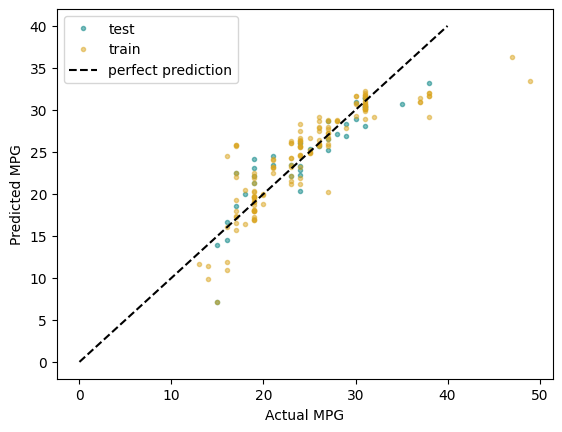
Plot prediction vs actual
# Set aside data for testing
X_train, X_test, y_train, y_test = train_test_split(X, y, test_size = 0.2)
# Normalize the data

sc = StandardScaler()

# Calculates mean and stdev of X_train
sc.fit(X_train)

Z_train = sc.transform(X_train)

# Choose our model type (linear regression) and fit the parameters
linreg = LinearRegression()

# This fit is where we get values for thetas (our parameters)
linreg.fit(Z_train, y_train)

linreg.__dict__
{'fit_intercept': True,
 'copy_X': True,
 'tol': 1e-06,
 'n_jobs': None,
 'positive': False,
 'n_features_in_': 3,
 'coef_': array([[-5.2496175 ,  0.69410527,  0.96797346]]),
 'rank_': 3,
 'singular_': array([14.24305812, 11.83718112, 10.05069344]),
 'intercept_': array([24.72972973])}
2.4.3. Model Evaluation#
# Make predictions with the model
y_pred_train = linreg.predict(Z_train)
# Make predictions on our test data

Z_test = sc.transform(X_test)
y_pred_test = linreg.predict(Z_test)
R2_train = r2_score(y_train, y_pred_train)
R2_test = r2_score(y_test, y_pred_test)

RMSE_train = root_mean_squared_error(y_train, y_pred_train)
RMSE_test = root_mean_squared_error(y_test, y_pred_test)

print(f'Train: \tR2: {R2_train:.3f}\tRMSE: {RMSE_train:.3f}')
print(f'Test: \tR2: {R2_test:.3f}\tRMSE: {RMSE_test:.3f}')
Train: 	R2: 0.746	RMSE: 3.227
Test: 	R2: 0.789	RMSE: 2.689
plt.plot(y_test, y_pred_test, '.',
         color = 'teal', alpha = 0.5,
         label = 'test')
plt.plot(y_train, y_pred_train, '.',
         color = 'goldenrod', alpha = 0.5,
         label = 'train')

plt.plot([0, 40], [0, 40], 'k--',
         label = 'perfect prediction')

plt.xlabel('Actual MPG')
plt.ylabel('Predicted MPG')
plt.legend()
plt.show()